
12 easy ways to grow your Mediavine income [2026]
I may get paid commission for purchases made after clicking a link in this post.
Ads are an easy way to make good money as a blogger. But are you maximising your ad revenue? Here are 12 easy ways to grow your Mediavine income…
Ads are a great way to make good money as a blogger. Once they are up and running (which, if you choose a great company to work with, like Mediavine, is very quick and painless) you can literally sit back and watch as the money rolls in – with very little effort on your part!
The other thing I love about ads is that they free me up to create the content I want to create… and more importantly, to create the content my readers want to read.
Contrast this with, say, earning money from sponsored posts. If you choose to monetize using sponsored posts, you are having to create a lot of content that isn’t necessarily exactly what you want to be creating (or what your audience most want to read!) Whereas if you choose to monetize via ads, you can have total editorial freedom over your content.
Better still, with ads, the sky is the limit as far as your earning potential goes. With sponsored posts, you are very much limited by the amount of time you have available and the percentage of your content that you are happy to be sponsored.
And with ads, the money keeps coming, whether you are working hard on your blog, taking a day off – or even on holiday! With sponsored posts, if you don’t work, no money comes in.
(Please note: I am not saying that doing sponsored posts is bad per se – I have done, and still continue to do, some great sponsored posts… I very much believe in having diverse income streams as a blogger… but if a good chunk of your income comes from ads, you are free to pick and choose the best sponsored posts for your blog and your audience, as you are not so dependent on them to pay the bills!)

**NOTE: I don’t have ads on this site because I monetize this site with digital products. However, I have monetized my food blog with Mediavine ads since 2018. To see my Mediavine ads in action, head over to Easy Peasy Foodie.**
Why Mediavine?
So yay! Hopefully you are completely convinced that monetizing via ads is a great way to earn money on your blog. But how do you maximise that revenue (without plastering so many ads on your site your readers run away screaming)?
Well, the first step is of course to choose a good, high paying ad company.
There are lots of ad companies out there, but not all of them pay well or give a great service.
I first started out with Google Adsense – it was OK, I earned a little money each month with them, but I didn’t start earning really good money from ads until I switched to Mediavine.
In my first full month with Mediavine, my income was literally TEN TIMES what it was with Google Adsense (from pretty much the same number of pageviews) and that income has continued to increase every month as my pageviews have grown.
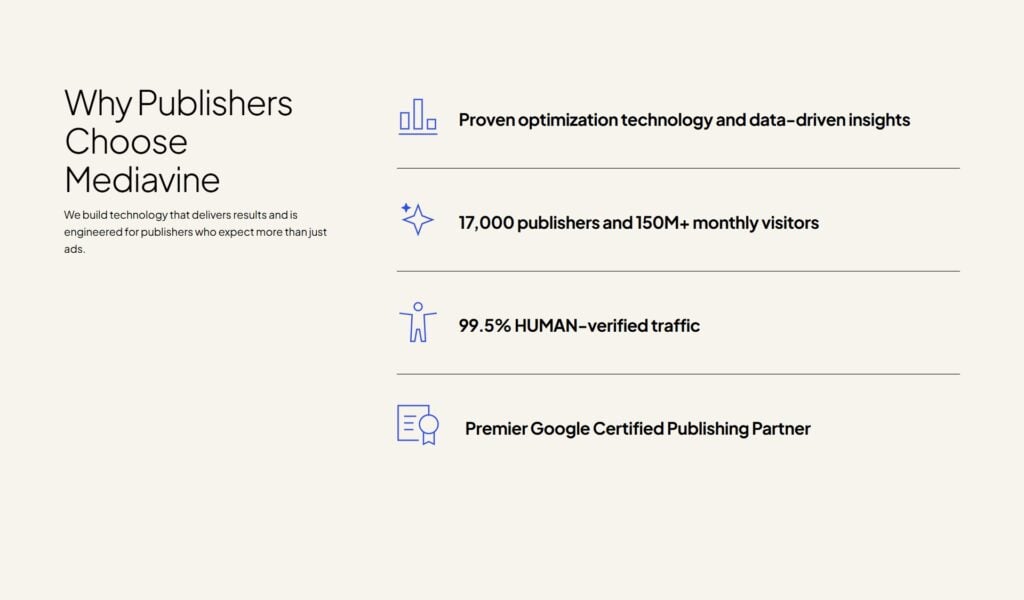
But great income is not the only reason I love Mediavine so much. They also have incredible customer service. They make the joining process super easy and they help you out with any technical adjustments you need to make. They handle all the complex ad bidding stuff, but leave you with plenty of control over where ads are shown and how many ads are shown on your site. And they are always on hand to answer questions and help with any problems.
And they always go above and beyond! There have been a few times when my income has dipped due to a technical problem. Every single time Mediavine have made up the shortfall – even when the problem was not their fault! Now THAT is what I call service.
They are also very sensitive to important blogging issues, like site speed, and are constantly innovating to provide the best service and highest revenues possible.
Requirements to join Mediavine
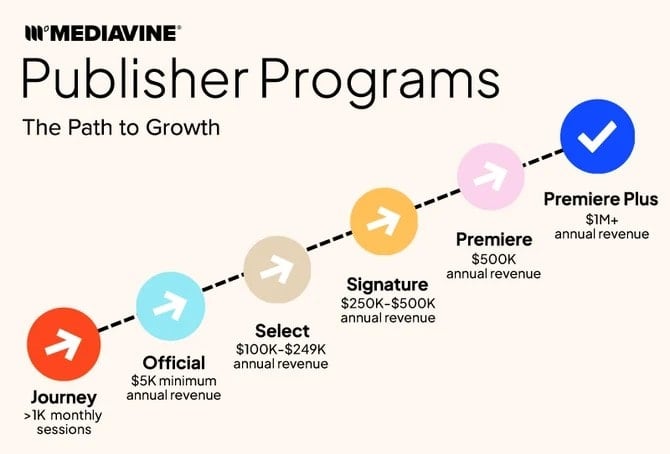
Sounds to good to be true? Well there is one snag! To be eligible to join Mediavine, you need to already be earning $5,000 per year in ad revenue.
To join Mediavine you will therefore need to:
- Already have had ads on your site for at least a year
- Already be getting around 25,000 monthly pageviews
(Strictly speaking there is no minimum pageview requirement to get into Mediavine. How quickly you get to $5,000 in annual ad revenue will depend on your RPM – the higher your RPM, the lower the number of pageviews you will need.)
To get ads on your site, your best option is to sign up for Mediavine Journey.
Journey is Mediavine’s ad management solution for smaller websites – you only need to be getting 1,000 sessions to qualify for Journey. This will allow you to begin earning ad income on your site, so you can demonstrate that ‘$5,000 per year from ad revenue’ criteria, and get Mediavine ads as soon as your site is eligible.
So really my very first tip on how to grow your Mediavine income is sign up for Mediavine Journey then work super hard on your SEO so that you reach that magical $5,000 per year threshold… and then immediately apply for Mediavine ‘Official’.
Don’t do what I did and keep putting it off… I hit the Medivine threshold in September 2017 (back when the threshold was 25,000 sessions), but didn’t get around to applying for Mediavine until January 2018, by which time I had over 100,000 pageviews. I still think about all that revenue I missed out on… I reckon I missed out on thousands! ☹
How much can you earn from Mediavine?
Ha – the million dollar question (kinda literally!) – how much can you earn from Mediavine? Well, it depends… and that’s basically what this post is all about. But as a rough rule of thumb you are looking at around $25 per 1,000 pageviews – and you can go much higher if you put in place the tactics I share below.
So if you have, say 60,000 pageviews per month, you can be looking at around $1,500 per month. And if you have 600,000 pageviews per month, you could be looking at over $15,000 per month!
So, assuming you have hit the Mediavine threshold, applied and been accepted by Mediavine, how do you grow your Mediavine income?
12 easy ways to grow your Mediavine income
1. Grow your pageviews
Put simply, there are two ways to grow your ad income – one is to increase the number of pageviews and the other is to increase your RPM. (RPM stands for Rate Per Mille – in other words the amount, in dollars, you get per thousand pageviews.) So, the first and most obvious way to grow your Mediavine income is to grow your pageviews.
Let’s say your RPM is $25 (i.e. you get $25 for every thousand pageviews per month), you will earn $1,500 per month if you have 60,000 pageviews, but $15,000 per month if you have 600,000 pageviews!
The best way to grow your pageviews rapidly is to focus on SEO (Search Engine Optimization). It is much quicker and the potential is much greater than relying on Pinterest or social media to drive pageviews.
If you do not know much about SEO, then take a look at my beginner’s guide to SEO.
If you want to take your SEO to the next level and rapidly get to Mediavine levels and / or grow your Mediavine income fast, then I highly recommend checking out my course, SEO Jumpstart, where I share the tips and tricks I used to grow my income from less than $100 per month to tens of thousands of dollars every month!
READ MORE >>> SEO Jumpstart Testimonials
READ MORE >>> SEO Jumpstart Case Studies
2. Write longer blog posts
The longer your blog posts, the more ads you will get per blog post and the more ads your readers will see. The more ads your readers see, the higher your RPM.
One easy trick to making your blog posts longer is to write lots of short paragraphs, instead of a few longer ones.
This tip has a double whammy effect because it will make your posts longer (= more ads = a higher RPM), but it is also good for your SEO, since shorter paragraphs usually means a better user experience (UX). To find out why it’s better for SEO to write in shorter paragraphs, check out my post on writing the perfect blog post.
Another way to make your posts longer is to write more words! (Yeah, I know – that’s kind of an obvious one!) Again, writing more words tends to have a double whammy effect as well – so long as they are the right words, that is! If you write more words – and those words are super helpful, you will be providing a greater UX to your readers and so your pageviews AND your RPM will increase.
And finally, another great way to make your posts longer is to add in more images – and make those images portrait, rather than landscape. Although don’t go too mad on this tip as too many images can be a negative UX and can make your site speed slower, which can also negatively affect your SEO.
READ MORE >> How to write longer blog posts (that your readers actually want to read!)
3. Use a bigger font and increase your line height
This is such a great trick… just using a bigger font and increasing your line height will make your blog posts longer and so increase the opportunity for more ads!
Mediavine recommend a font size of 18px and a line height of 1.6.
To increase your font size and line height, you will need to make a couple of tiny adjustments to your CSS – if you are not sure how to do this, or if you are scared of messing your blog up, ask your theme developer to do this for you. For someone who knows what they are doing, it’s a 5 minute job, so shouldn’t be very expensive, and you will earn that money back over and over again in increased ad revenue.
And hey, guess what – increasing your font size and line height also has a positive effect on UX and therefore your SEO, so another double whammy (are you sensing a theme, yet?)
4. Make your sidebar shorter
One of the key ad placements Mediavine offers is a sticky ad at the bottom of your sidebar. This ad will appear when your reader gets to the bottom of the sidebar and will stay there until they get to the bottom of your blog post. The longer that ad appears to your readers, the higher your RPM and so the higher your Mediavine earnings.
It shouldn’t be rocket science to figure out that, to make that ad appear for the longest time possible, you need a long blog post (already covered above) AND a short sidebar.
You need to be really ruthless here – cut out EVERYTHING in your sidebar that isn’t 100% necessary.
On easypeasyfoodie.com (the blog where I have Mediavine ads), my side bar consists of:
- My social media buttons
- A very short bio (which links to my about page, if people want to know more about me)
- A search bar
And that’s it! I have got rid of everything else.
And, sorry to sound like a broken record but getting rid of all the junk in your sidebar is likely to make your site faster and so is also good for SEO and therefore getting more pageviews!
5. Increase your site speed
Really this is part of SEO and so technically it’s part of point 1. But site speed is SO important, it really deserves an entry in its own right.
Site speed has a big effect on your SEO. In very simple terms, the faster your site, the more Google likes your website and the more your readers will like your website – both of these factors will have a positive effect on your search engine rankings and so your pageviews.
And the more pageviews you get, the more money you earn from ads!
To find out how to improve your blog’s speed, read my post on 11 easy ways to improve your site speed
6. Increase your ad density
OK so this is a slightly more controversial one.
You see, the issue with ads is there is always going to be a bit of a tension between RPM and UX/SEO.
You could, for example, increase your ad density so every other line is an ad and you have 100 ads per blog post. This would be GREAT for your RPM – which would go through the roof!
But it would be TERRIBLE for your UX – that many ads would be a horrible reader experience and likely put off all but the most determined readers – and also TERRIBLE for your site speed (ads slow your site down, ergo lots of ads slow your site down A LOT!).
If your UX and your site speed are really bad, you can bet your bottom dollar your traffic is going to take a nosedive.
On the flipside, you could reduce your ad density so you have hardly any ads – this would be GREAT for your UX and your site speed, but TERRIBLE for your RPM!
However, there is a happy medium and increasing your ad density just a little bit can improve your RPMs without compromising your UX and site speed so much that it affects your pageviews.
I highly recommend dialling your ad density up a notch and leaving it for a couple of months to see if it has any impact on your pageviews.
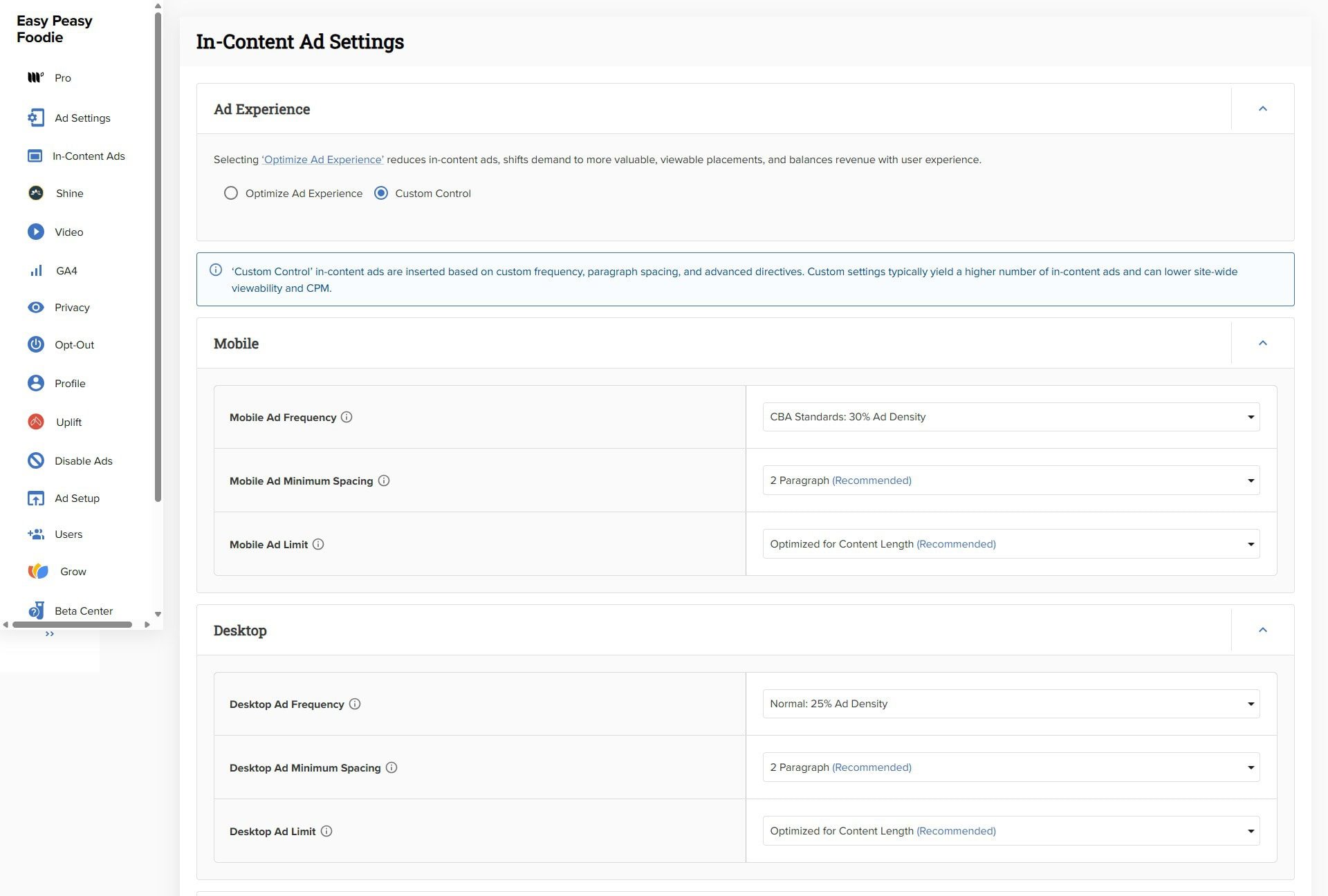
To increase your ad density, go to your Mediavine dashboard and head to SETTINGS >>> IN CONTENT ADS. And then look for MOBILE AD FREQUENCY and DESKTOP AD FREQUENCY. The higher the %, the more ads you have as a percentage of your overall content.
For reference, I have mine currently set to 30% on mobile and 25% on desktop and I feel this isn’t too intrusive to my reader, I’m happy with my site speed and, crucially, my pageviews are still increasing year on year.
But don’t take these figures as gospel – every blog is different. What works for my blog may not work for yours, so experiment and find the sweet spot for your blog.
7. Increase your ad minimum spacing (possibly)
In the same screen, you can increase your AD MINIMUM SPACING. In other words, the minimum number of paragraphs between ads. Currently the choice is 1, 2 or 3 paragraphs.
Again, tread very lightly here – having ads appearing between every single paragraph here will certainly improve your RPM, but almost certainly negatively affect your UX / SEO and so your pageviews.
But if you have your set to every 3 paragraphs, it may be worth trying every 2 paragraphs – at least on mobile – and seeing what happens. (Remember, because the text gets squished on mobile, paragraphs look much longer and so the ads are further away from each other.)
Personally, I have mine set to every 2 paragraphs on both mobile and desktop. But the same caveat as above applies – what works on my blog, may not work on your, so do your own testing!
And a quick caveat about testing while I am at it – the effect of making changes in this screen has a near instant effect on your RPM, but the effects on your SEO/pageviews takes much longer to filter through – often as much as 2-3 months! So, make small changes at a time and give it a good while to bed in before making more changes.
8. Set Ad Limits to ‘Optimized For Content Length’
If you have carefully chosen a sensible ad frequency and sensible ad minimum spacing, you can afford to make set AD LIMITS to ‘OPTIMIZED FOR CONTENT LENGTH’.
You know that ads are only going to appear as frequently as you have allowed them to, so the only result of setting ad limits will be to negate the benefit of creating those long posts!
You’ve gone to all that trouble of creating nice long posts, but you will only benefit from those long posts if you give Mediavine free reign to keep putting ads in all the way to the bottom of your very long post.
If you limit the number of ads here, Mediavine will essentially ‘run out’ before they get to the bottom of the post. Or rather, what is more likely to happen, is your ads will get more spaced out – making all the effort you went to get ad frequency and ad minimum spacing ‘just right’ a bit pointless.
My strong recommendation here is set AD LIMITS to ‘OPTIMIZED FOR CONTENT LENGTH’ first, then spend time getting your ad frequency and ad minimum spacing just right for your readers (and search engines!)
9. Enable video Ads
To get the really good RPMs you need to enable video ads.
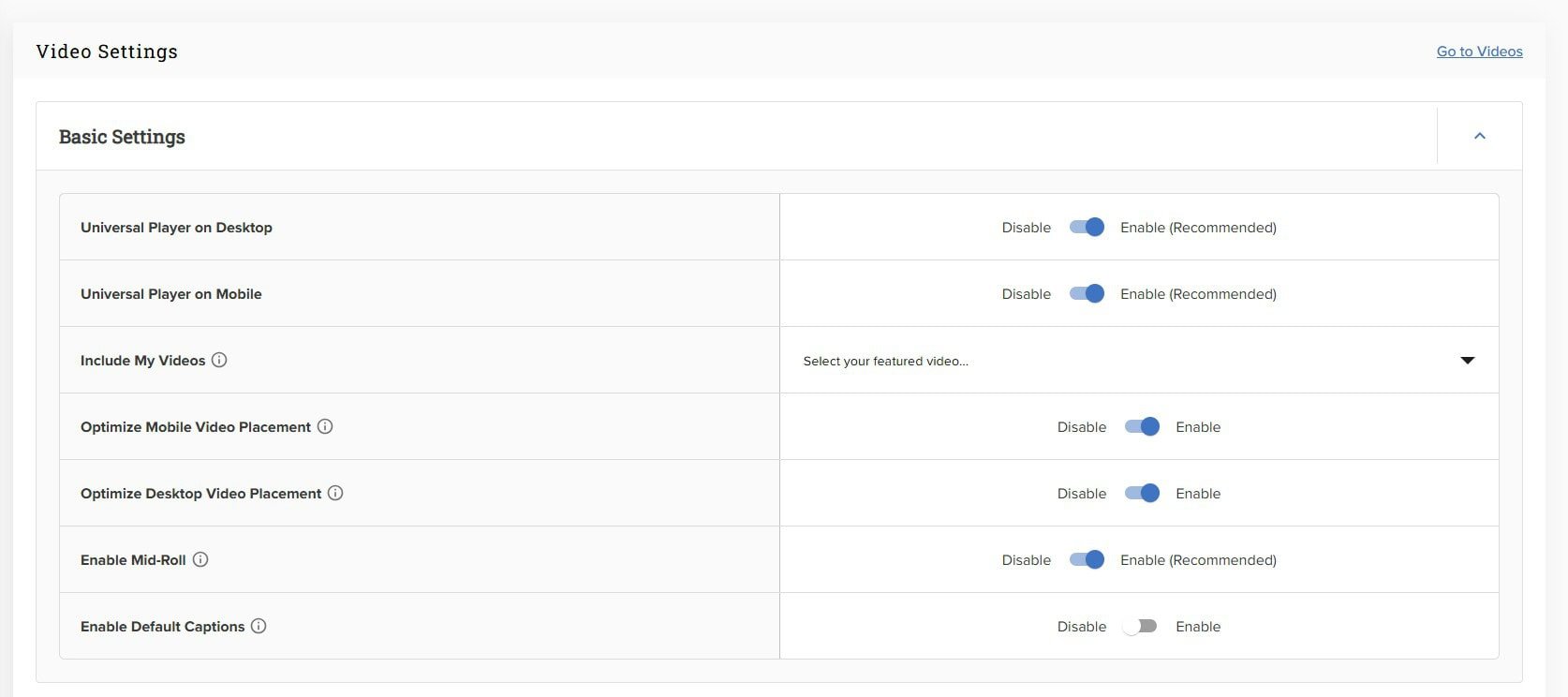
The beautiful thing about Mediavine is you don’t have to create your own videos to earn ad income from videos. Mediavine have a video ad unit called ‘Universal Player’. You simply go to SETTINGS >> VIDEO and toggle UNIVERSAL PLAYER to ON on both Mobile and Desktop.
Again, it’s worth pointing out that having a video ad unit on your site will slow your site down, which, in turn, is likely to have a negative effect on your pageviews, so it’s worth experimenting a bit here to get the right balance between RPM and site speed/SEO.
I would also recommend enabling OPTIMIZE VIDEO PLACEMENT on both Mobile and Desktop, as this will allow Mediavine to automatically optimize the placement of your video to maximize revenue.
And, of course, the same caveat applies here – this is what I have found to work on my site, but you need to do your own testing to find the right balance for your site.
If you do decide to turn on the video ad unit for mobile and/or desktop, I would certainly test your site speed using Google PageSpeed Insights BEFORE and AFTER to see what impact this ad unit has on your site speed.
10. Turn on ‘Optimize for core web vitals’
This is another slightly controversial one.
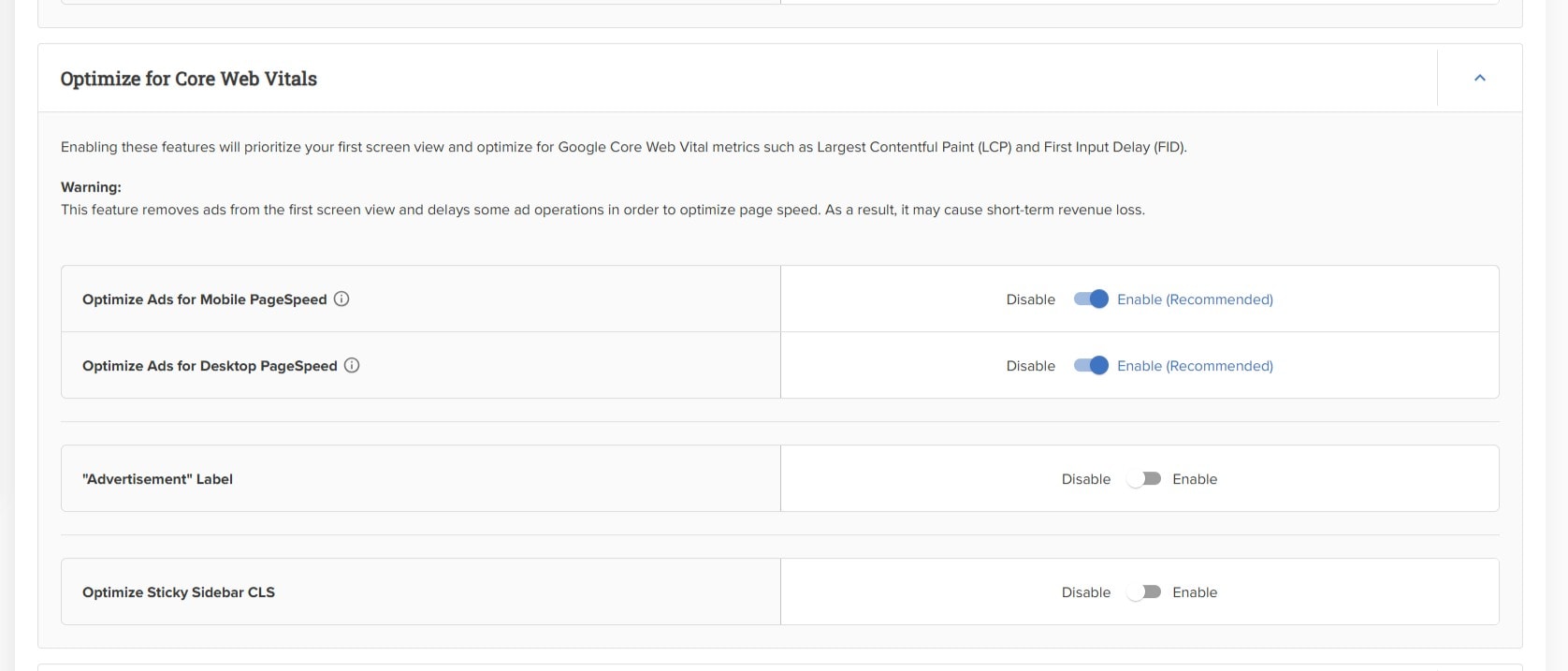
If you go to SETTINGS >>> AD SETTINGS in your Mediavine dashboard, you will see an option to OPTIMIZE FOR CORE WEB VITALS.
This option allows you to prioritize Core Web Vitals over RPM on both mobile and desktop. Or, in Mediavine’s words, “Enabling these features will prioritize your first screen view and optimize for Google Core Web Vital metrics such as Largest Contentful Paint (LCP) and First Input Delay (FID). This feature removes ads from the first screen view and delays some ad operations in order to optimize page speed.”
In other words, this feature makes sure that getting your content to shown to your reader as fast as possible is prioritized over showing ads to your reader. This means that your content will appear first to your reader and then your ads. This is great for site speed (and therefore UX and SEO), but not so great for your RPM (since your reader is likely to scroll down before the first ads have loaded and so miss some ads they might otherwise have seen).
My personal opinion is it is best to have this turned ON for both Mobile AND for Desktop – as I believe the slight RPM drop will be more than offset by increased traffic, thanks to a better UX. BUT, as always, I recommend you do your own testing!
(And remember, changes will be reflected in RPM almost instantly, but may take several weeks or months to affect search engine traffic.)
**As with all your ad settings, it is important to prioritize REVENUE and not RPMs. Many bloggers get totally hung up on RPMs and forget that…
REVENUE = RPM x TRAFFIC
Of course you can massively increase your RPMs by having dozens of ads plastered all over your site, but this would have the effect of dramatically reducing your TRAFFIC, and therefore your REVENUE would eventually take a nosedive. Instead, be sure to prioritize a good balance of UX and RPM – this will lead to increased TRAFFIC and therefore increased REVENUE over time.**
11. Write lots of seasonal content
Ad revenue is very seasonal. You see massive peaks in RPMs at important holiday times, particularly Christmas, Easter, Thanksgiving etc. You also see big RPMs at the end of each quarter (March, June, September, December).
So, it makes sense to create plenty of content for these peak RPM times.
And if you only focus on one, focus on Christmas.
Christmas gives you a wonderful triple whammy… you get high RPMs because it’s Christmas AND the end of the final quarter. AND you get much higher pageviews because at Christmas there is a massive increase in Google searches.
The result of this is that Christmas ad income is usually double, triple, maybe even quadruple or more the income you get at other times of year. The more Christmas content you write, the more you are going to capitalize on this!
12. Optimize your best posts
My final bit of advice is to make sure you prioritize optimizing your top 20 best performing posts – both for SEO and RPM (using all the advice above). This is because the majority of your pageviews (and therefore revenue) will come from those top 20 posts. Anything you can do to make them get more pageviews or better RPMs will have a much bigger effect than optimizing 100 or more of your worst performing posts!
This piece of advice comes with another big caveat, though. You need to be very careful when fiddling with your top performing content. If you make too many changes all in one go, even if they are really positive changes, you can sometimes see a dip in search engine traffic.
The reason for this is probably because Google wants to be sure the changes you are making are good ones (and not some dodgy black hat SEO tactic to trick your readers). And, assuming you have made good changes, you will certainly see your post performing better in the long run.
But if you depend on your ad income, you want to tread very carefully with your top performing posts. My recommendation is make changes to your most popular posts gradually. (With your less popular posts, you can be a lot more gung ho, though!)
Why SEO is so important if you want to maximize your ad income…
SEO (Search Engine Optimization) is super important if you want to maximize your ad income.
Firstly, by using SEO techniques, you will be able to grow your blog quickly to the traffic levels required to join a high paying ad company, such as Mediavine.
And secondly, SEO will help you continue to grow your blog traffic, so you get more and more revenue each month.
If you would like to learn more about SEO and grow your blog traffic, I highly recommend taking a look at my SEO Jumpstart course. In it, I share the tips and techniques I used to successfully grow my blog traffic and income to the point where I am earning 5 figures + every month in passive ad income!
Don’t miss a thing!
Follow me on Twitter, Facebook and Instagram. Or why not subscribe to Productive Blogging and get blogging and productivity tips straight to your inbox every week?
Pin this post to read later
What an incredible article, thank you ever so much for writing it. I just had one question. Early into the article, you mention how you show people how you started with $100 and then made $1000’s a month but surely at $100 you’d only be getting 10,000 page views and therefore under the number of sessions needed (25k) to be a part of Mediavine in the first place. Or was this referring to the $100 you were making from Google ads?
Any clarification on that would be wonderful.
All the best
Sean
Hi Sean! Sorry I wasn’t very clear. My final paycheck from Google Adsense was $100 – and I was getting roughly 100,000 pageviews at the time. I then switched to Mediavine and my first paycheck from Mediavine was $1000 – from roughly the same number of pageviews. In other words my Adsense RPM was about $1 per 1,000 pageviews wheras my RPM from Mediavine when I started was about $10 per 1,000 pageviews. The tactics I share in the SEO Jumpstart Course are the ones I used both to grow my blog to the 25k sessions needed to join Mediavine AND to grow my blog since joining Mediavine in order to increase my Mediavine income each month. Hope that helps! And feel free to ask any further questions you may have. Eb 🙂
This was very helpful! I didn’t know about some of these settings so I’ve updated some of them 🙂
Yay – so pleased it helped! Eb 🙂
This is definitely one of the more helpful and well written articles I’ve read while starting up my blog. Thank you!
Hi Erica, Thank you so much for this lovely message 😀 I am so pleased my blog has helped you! Eb 🙂
Thanks for such an informative post Eb. I’ve had time to return to blogging over the past few months and have learned so much today. I now have a list as long as my arm on my to do list. I think I’ll be revisiting your blog to check what I have to do next to get my blog up to scratch.
You are welcome, Sarah! So pleased you found it helpful 😀 Hope you find lots more helpful stuff on my blog! Eb 🙂
Thank you for this insightful post!
You are very welcome – glad you found it useful! Eb 🙂
Thanks for sharing these great blogging tips. I’ve implemented some of them on my blog and definitely seen an increase in ad revenue.
You are welcome – that’s great to hear!
I came across your article following my Mediavine application. My blog is over 20 years old and I’ve never wanted to advertise on it because of concerns about visual pollution. But a friend recently told me about this type of advertising and I agreed. Today I have over 140,000 sessions a month and I can see how much money I’ve lost. But better late than never, as they say in France. Thank you so much for your advice!
Translated with DeepL.com (free version)
I totally understand about not wanting ads of your site because of how it looks – I resisted for a long time too! I would definitely encourage you to work with Mediavine to get a ‘happy medium’ between no ads and intrusive ads. If you take a look at my website, Easy Peasy Foodie, you’ll see that’s what I have tried to achieve there. So it is possible! Eb 🙂
I have started a lifestyle blog and currently trying to get in Mediavine.
Great to hear! In that case you might be interested in these 2 posts:
https://climb-logic.live/everything-you-need-to-know-about-journey-by-mediavine/%3C/a%3E%3Cbr /> https://climb-logic.live/make-money-with-mediavine-ads/%3C/a%3E%3Cbr /> Good luck!
Thank you for this great article! There are so many good tips in here. I am heading out now to clean up my sidebar 🙂
Aw, that’s great to hear!